Our Location
1250 Beacon Street
Brookline, MA 02446
Struggle with a washing machine not spinning? Discover 8 common causes and simple DIY solutions to get your laundry routine back on track.
Have you found your laundry still soaking wet after a spin cycle? This might be due to simple imbalance. It can add hours to your day. Plus, it might lead to mold or bad smells in just a day.
A non-spinning washing machine disrupts routines in many households. It results in wet clothes needing more time to dry. This increases energy costs and raises the risk of mildew in fabrics. We’ll show you why your washing machine drum might stop turning and what actions you can take immediately.
We’ll go over eight common reasons and straightforward DIY solutions. This will help you decide whether to fix the issue yourself or to call a technician. The topics we cover include checking power and outlets, testing the lid switch, examining the drive belt and motor, cleaning the water pump, fixing drainage problems, and making sure loads are balanced correctly.
Always prioritize safety: unplug the appliance or turn off the circuit breaker before you look at any internal parts. Also, check the manufacturer manuals from brands like Whirlpool, LG, Samsung, or GE for specific advice.
We aim to assist you in avoiding unnecessary repairs and saving money with easy solutions. We also want to help you prevent future issues by improving your laundry habits and maintenance. Plus, we’ll give you an idea of the typical costs for professional repairs when they’re needed.
When a washer won’t spin, it might be a simple fix or something less obvious. The spin cycle needs several things: the tub must drain, the motor or transmission must work, and safety sensors or locks must tell the control board it’s safe to spin. Problems like faulty lid or door locks, a pressure switch thinking the drum is full, or a pump not clearing water can stop the cycle before the drum speeds up.
Many think a non-agitating washer means a dead motor. This leads to buying parts you might not need from brands like Whirlpool, LG, and Samsung. If a washer stops mid-cycle, it might show codes like E2 or F7. These codes usually hint at issues with drainage, door or lid locks, or motor overload, not a dead motor.
It’s useful to know the difference between a washer not agitating or spinning and one just not agitating. Agitation issues affect washing. Spin issues prevent the drum from hitting high speeds to extract water. Start by checking for simple mechanical problems to save time.
Getting the load balance right is crucial for a washing machine drum to spin correctly. Bulky items like comforters can shift, causing the machine to shake violently. Modern washers will stop the spin to prevent damage to the machine’s parts.
To troubleshoot, confirm the drain step finished, listen for odd noises during spin, and check for blockages in the pump or drain hose. Consulting the manual for your Whirlpool, LG, or Samsung washer can provide troubleshooting steps for specific error codes.
To prevent problems, spread out laundry evenly, stick to recommended load sizes, use bags for small items, and don’t mix heavy items with light ones. Following these steps helps avoid issues with the drum not spinning and reduces repair visits.
| Issue | Likely Cause | Quick Check |
|---|---|---|
| Washer stops before spin | Blocked pump, drain hose kink, error code (E2/F7) | Run drain cycle, inspect hose, read error code in manual |
| Machine vibrates but won’t reach speed | Unbalanced load, worn suspension, heavy single item | Redistribute laundry, try smaller load, remove bulky item |
| No agitation and no spin | Lid/door switch fault, belt or transmission issue | Check lid lock, listen for motor hum, inspect belt access |
| Intermittent spin failures | Control board logic, thermal motor overload, loose wiring | Note error patterns, reset power, inspect connections |
| Drum slows under load | Motor struggle, worn bearings, heavy load | Test with small load, listen for grinding, check drum rotation |
A cut or weak electrical supply can make the spin motor or control board stop working. If your washing machine won’t spin, checking the power supply is a good first step. It’s simpler than tackling more complex repairs.
Before touching the cord, unplug the washer. Look out for fraying, burn marks, melted insulation, or damaged prongs. For machines from Samsung, Whirlpool, or GE, whether they’re front-load or top-load, check the power cord is well-plugged into a three-prong outlet.
Seeing any burn marks or melted plastic means it’s time to stop. Call a professional electrician. You can often replace a bad cord yourself. Just make sure to use an original or approved part to prevent electrical issues or voiding your warranty.
Most U.S. washers operate on 120V. Some need different voltages, especially the older or heavy-duty types. Always check the machine’s label for the right voltage before you test.
To test, use a multimeter at the outlet. If it shows a steady 120V (or the expected voltage), your outlet is fine. If there’s no voltage or if it’s unstable, inspect the breaker panel and any GFCI or AFCI devices in your basement or garage that might have triggered.
To fix a tripped GFCI, press the reset button. If breakers keep tripping, you likely have an electrical issue needing an electrician’s attention. If you notice burn marks, loose connections, or odd voltage at the outlet, get help from a professional.
When fixing a wash machine that won’t spin, ensure the circuit only serves the washer and all connections are secure. By checking everything step by step, you often can find out why your washing machine isn’t spinning. This can save you from switching parts that are actually fine.
The lid or door switch ensures the washer’s safety, allowing it to spin correctly. When this switch fails, the washing machine might not spin, although it can fill and mix the laundry. Top-load washers use a lid switch with a plunger. Front-load washers have a door lock with a magnetic or mechanical sensor.
How the switch works
When you close the lid or door, it sends a signal to start the spin and drain cycles. If the switch or lock fails to engage, the washer won’t spin or drain. This is why sometimes a washer might mix clothes but not spin or drain them.
Lid switches often use a small part that moves when you close the lid. This action presses a microswitch or aligns a magnetic sensor, signaling it’s safe to operate. For front-load washers, the door latches and locks this signal in, allowing the motor to speed up, thus fixing any issues with the drum not turning.
You may see the washer fill and mix but not spin if the switch is faulty. It might stop during a cycle or not click when closing. Error messages about the door or lock suggest a problem with the spinning function.
Quick diagnostics
Always disconnect power first. The switch is usually under the top panel of top-load machines, near the hinge. For front-load machines, it’s by the door latch. Check for broken parts, loose wires, or rust. Use a multimeter to check if there’s continuity when the lid or door is shut. For front-load washers, also check the lock assembly’s resistance matches the manufacturer’s specifications.
DIY fixes and parts
Fix a misaligned actuator or replace a broken plunger yourself. You may need a new microswitch or a whole door lock assembly. Use only original parts from big brands like Whirlpool, Maytag, LG, or Samsung. Make sure the parts fit your washer model. You can buy them from the manufacturer or trusted stores.
Safety note
Unplug the washer before starting any repairs. Be cautious of the door-lock assembly because it can hold a charge. Contact a professional if you’re not sure. This avoids any risk of damage or injury.
Begin by understanding how the drive system works. Many top-loaders have a belt-driven motor. Front-loaders and new machines might use direct-drive motors or a motor-coupler. A damaged belt, broken coupler, or frozen motor can stop the spin cycle, leaving your washer not spinning.
Start by taking off the access panel as your model’s manual suggests. For Whirlpool and Maytag top-loaders, this panel is usually at the back. For Kenmore or LG models, it might be under the cabinet. Look for any cracks, fraying, glazing, or looseness in the belt.
If the belt is broken, it’s easy to notice. A belt that slips may squeal during a spin attempt. If the belt is shiny or missing parts, get an OEM belt for a fix. This can solve the spin cycle issue.
Examine the motor pulley and idler for damage. Fix or lubricate them if they’re loud or showing wear. The right belt path and tension are key for the washer to work well.
Listen for a humming noise which might mean the motor is stuck. Check for a burnt smell or visible damage. Use a multimeter to test the motor’s windings according to the maker’s instructions. Windings that are open or shorted often mean the motor needs replacing.
Look at the motor coupler on certain GE and Whirlpool models. If the plastic or nylon parts are broken, the washer might move but not spin. You can change the coupler yourself for a low cost. This can repair a washer that won’t spin.
For washers with a clutch or gearcase, look for damaged clutch pads or oil leaks. These issues can keep the drum from spinning right, even if the motor is running.
If the belt and coupler are okay but the motor isn’t working right, calling a technician might be best. This is often the step after motor tests fail. It’s common when you can’t fix the spinning problem on your own.
Use OEM parts for the best results. Watch repair videos specific to Whirlpool, LG, or Maytag. They teach you how to place the belt right, set the right tension, and handle the motor safely. Following these steps can fix your washer’s spinning issue and prevent further damage to the drive system.
If your washing machine isn’t spinning, check out the water pump first. It needs to drain before spinning fast. A blocked or broken pump might stop the drum from turning. This guide will show you how to tackle spin problems and what to check if your washer won’t spin.
If water stays in the machine, it’s a big red flag. You might also see slow drainage, hear weird noises, or find your clothes still wet. Error messages about draining could pop up. Sometimes, you’ll hear the pump but see no water movement. These are signs of something blocking the pump or a broken part stopping the drum from spinning.
First, unplug the washer and turn off the water supply. Pumps are generally at the bottom, either in the front or back. Different brands like Bosch or Whirlpool might place them differently. Look at your manual before you start removing panels.
Put down towels and a shallow dish to catch any drips. Take off the hoses and look for blockages like change, hair pins, or dust bunnies. If there’s a filter in the pump, clean it out. Make sure the impeller hasn’t cracked or gotten clogged.
After cleaning, do a quick drain and spin cycle to check if the issue is fixed. If the pump motor doesn’t work, use a multimeter to test it.
Should the motor or impeller be shot, get a new pump. Drain the water, remove the old pump, and put in the new one carefully. Reattach everything, then check for leaks and that it’s working right.
Remember to be safe: turn off the power, wear gloves, and watch out for sharp edges and hot water. If fixing it or replacing parts feels too tricky, call a professional appliance repair person.
Drainage faults can prevent a washing machine from properly emptying. This can cause issues with the spin cycle due to safety features. Quick checks and easy fixes might help you solve the problem without needing professional help.
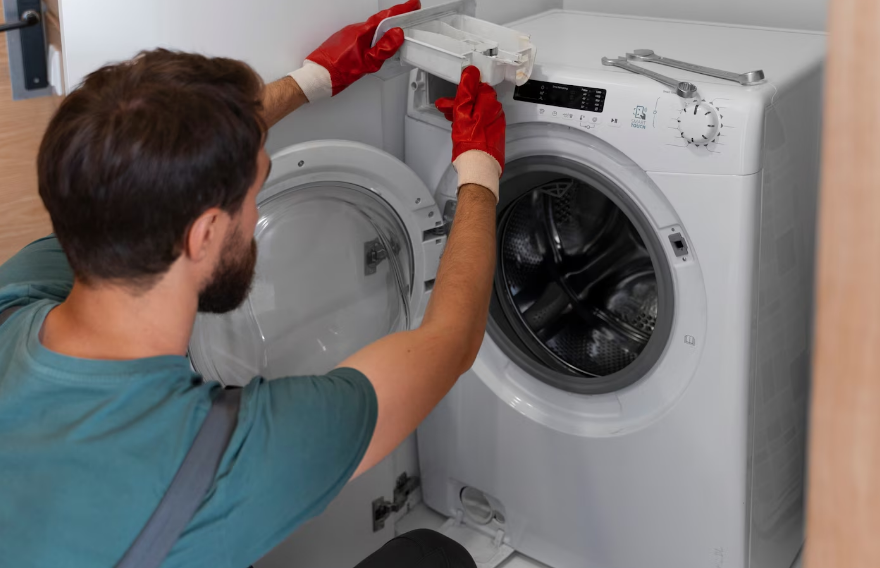
If you see water left in the drum, the drain might be blocked. You might also see the washer stop before spinning. It may show error codes for drainage issues.
Drains that empty slowly, bad smells, and loud noises during draining suggest clogs or pump issues.
First, examine the drain hose for any bends, squashes, or if it’s too high. It should be between 30 and 96 inches high. Make sure it’s not too far in the standpipe or too tightly sealed.
Then, check your home’s drainage. Run water to see if it backs up. Clear any blockages with a snake or use chemical-free cleaners.
Access the pump filter on front-loaders and some top-loaders. Use a pan to catch spills, open the filter, and clean it. Flush the hose or use a wire to clear deep clogs.
If you still see blockages after these steps, using a sink auger might help. If that fails, it’s wise to call a professional plumber to avoid further issues.
To avoid future problems, clean your machine with hot water and vinegar sometimes. Use less fabric softener and avoid overloading. These actions can prevent many common washing machine problems.
Learning these drainage solutions can help solve spinning issues and keep your machine in good shape.
If your washer stops mid-cycle or won’t spin, it could be due to an uneven load. Modern washing machines have sensors. They slow down or stop the spin to avoid damage. Often, rearranging how you load your clothes can solve the issue without needing repairs.
Putting heavy items with light ones in the washer can cause trouble. This mix creates an off-center mass. It makes the machine vibrate and wobble too much. And if you wash a big item, like a comforter, by itself, it may not spin right.
If your washer stops spinning, it might be because it senses the load is off-balance. It tries to fix this on its own. But sometimes, you need to step in and rearrange the clothes if it keeps having trouble.
Spread your laundry out evenly in the washer. Put heavy items opposite each other to keep things balanced. Don’t wash big items by themselves. Instead, add some towels to help with the balance and ensure a smooth spin.
Check your washer’s manual to see how much it can hold. This goes for brands like Samsung, Whirlpool, GE, or LG. If you’ve only got a few items, run a smaller cycle. That way, the washer can adjust better. Use the “spin only” or “drain & spin” option to finish cycles that get stuck.
If you need to fix an imbalance while washing, stop the machine and rearrange the clothes. For front-loading washers, you might have to use a special function to open the door or drain water. Do this before fixing the load.
Sort your laundry before washing to prevent these issues. Use bags for delicate items. And avoid putting too much in the washer. These steps will keep your machine running smoothly and stop spin cycle problems before they begin.
| Problem | Quick Fix | When to Call Repair |
|---|---|---|
| Single bulky item causes wobble | Add towels to balance or wash with similar items | If drum not spinning properly after reloading |
| Mixed heavy and light garments clump | Redistribute evenly around drum; use smaller cycle | Persistent vibration or error codes repeat |
| Small load keeps failing to spin | Combine with more items or select small-load option | Machine won’t complete spin despite proper load |
| Washer senses imbalance mid-cycle | Pause, open door safely, rebalance, restart | Repeated failures of spin cycle after attempts |
The control board is a key electronic part that controls the washing machine’s processes. These include the fill, agitate, drain, and spin steps. When it doesn’t work right, you might find your washing machine not spinning. It could still drain water and the lid switch might work. But, if the board has issues, it might not follow spin commands or respond to the control panel. This means your washer won’t spin, even if the belts and motors seem okay.
Watch out for odd problems like missed spin cycles, wrong error messages, or a control panel that doesn’t answer. Your washer might fill up with water and drain, but then it won’t spin. Sometimes, pressing buttons doesn’t work right, or the washing cycle ends too soon. These issues usually mean there’s an electronic problem, not a mechanical one.
Checking the control board closely might show you loose connections or parts that look burned or swollen. If you see damaged solder or areas that look overheated, it’s likely the board’s fault, not just a wire problem.
First, try turning the machine’s power off and on. Unplug it or flip the breaker for 1–5 minutes, then turn it back on. This reset trick can fix small issues and might make the spin cycle work again.
Different brands might need you to press certain buttons in a special order to reset. Brands like Whirlpool, LG, and Samsung have their own reset steps. Look in the manual for specific instructions if just turning the power off and on doesn’t work.
If a simple reset doesn’t solve the problem, it’s time for more detailed checks. Use a tool called a multimeter to measure electricity at the board and where the motor connects. Some washing machines have a special mode for fixing problems; use this to check for error messages and to test parts. This helps you figure out if the issue is with the board or something else it’s connected to.
Think about getting a new board if you see damage or if tests show parts aren’t working right. Make sure to buy the right board for your machine model. Having a professional install it is a good idea because it needs to be set up correctly and handled safely.
Remember to be safe. Even after you unplug it, electronics can still shock you. Always turn off the power completely and be careful of static electricity when you touch the control board.
| Symptom | Possible Cause | Suggested Action |
|---|---|---|
| Washer completes drain but skips spin | Control board failed to send spin relay signal | Power-cycle, run diagnostics, check relays and connectors |
| Control panel unresponsive | Faulty touchpad or board input stage | Inspect touchpad ribbon, test inputs, consider board replacement |
| Incorrect or intermittent error codes | Burned traces, bad capacitors, or flaky memory on board | Visual inspection, multimeter tests, replace OEM board if damaged |
| Washer won’t spin after a reset | Persistent board fault or wiring failure | Enter service mode, check voltages, seek professional repair |
If your washing machine isn’t spinning, even after you’ve checked the basics, it’s time to call a pro. Signs like constantly tripping breakers, a burnt smell, smoke, or leaking oil are big warnings. Also, if the motor only hums, the control board is damaged, or DIY fixes keep failing, get help.
Think about safety and your warranty when fixing a non-spinning washing machine. Doing repairs yourself can void warranties. If your machine is still under warranty or has a service plan, reach out to authorized centers for brands like Whirlpool, LG, Samsung, or GE before you try to fix it yourself.
Repair costs in the U.S. can vary by location and washing machine model. Expect to pay $75–$150 for a service call. Parts like belts or pumps usually cost $30–$150 plus labor, and lid switches $20–$80 plus labor. Motors and control boards can be pricey, costing $150–$500 and $200–$600, respectively. For transmission repairs, you might spend $300–$800 or more. If fix-ups cost near half the price of a new machine and yours is over 8 years old, consider buying a new one.
When picking a technician, make sure they’re licensed and can work on your brand. Look at reviews on Angi or Yelp, and ask for estimates and part warranties. Also, inquire about repair guarantees. Keep track of your maintenance, prefer OEM parts, and keep doing regular maintenance like cleaning filters and checking hoses. Avoid overloading your machine too. These actions will help prevent future spin issues and guide you in making wise decisions for solving washing machine problems.