Our Location
1250 Beacon Street
Brookline, MA 02446
Struggling with a slow dripping coffee maker? Our guide helps you descale and replace filters for a swifter brew. Get quick, easy solutions here!
Did you know scale buildup can slow water flow by up to 40%? This makes your morning coffee pour slow. It’s why your coffee maker might drip slower than expected.
This guide is for home brewers and small café operators in the U.S. It explains how to fix a slow dripping coffee maker. You’ll learn about scale and clogged filters. Also, we’ll cover safety steps before opening the unit. Plus, routine care can stop unexpected breakdowns.
By the end of Section 1, you’ll know why your machine might drip slowly. Descaling every few months is important (Urnex suggests doing it quarterly). Changing the filter can also solve slow drip issues quickly. You might not need to call for help.
When your coffee maker drips slowly, it takes longer to brew and the flavor may not be as good. This issue can be due to simple clogs or mineral buildup in the machine. To fix a slow drip, check common parts and your usage habits before you think about calling for help.
Clogs in the machine can cause it to drip slowly. A clogged filter or basket can catch too many coffee grounds and reduce the coffee flow. A low pump pressure, a blocked spout, worn-out gaskets, or a misseated reservoir can also reduce flow or stop it altogether.
Scale that builds up in boilers and narrow paths can decrease water flow. If valves or hoses are faulty, it might seem like a pump failure. However, sometimes just cleaning or adjusting them can fix the problem and make your coffee drip normally again.
Putting too much coffee or not spreading it evenly can block water passages. If you use a damaged or not properly aligned paper filter, it lets grounds into the machine, which can block it. Problems with the grinder and not consistent grind size can also slow down the extraction speed.
Make sure you use the right grind size for your Drip or pour-over machine. This can help avoid clogs and make your machine work better without needing to clean it so often.
Hard water has calcium carbonate which turns into scale when it heats up. This scale sticks to parts of the machine and over time can slow down the coffee flow. Soft or distilled water can help prevent scale but might increase corrosion in some coffee makers.
Using water treatments and filters can keep the water flow consistent and reduce the need for repairs. Regularly running fresh water through your coffee maker can also prevent scale from building up quickly.
Keeping your coffee maker in top shape stops it from running slow and keeps your coffee tasting fresh. Doing simple things like cleaning can avoid problems like scale build-up, clogs, and weird noises. These are signs your machine is getting old.
How often to clean varies with how much you use it. Wash the carafe daily and empty the drip tray. A deep clean of the brew basket and parts you can remove should be done weekly. If you’re brewing a lot daily, then clean every two weeks. Descale every three months with Urnex, or sooner if your water is hard.
A coffee maker that’s taken care of works better. Regular cleaning ensures the pump and heater do their jobs well. It also keeps the taste fresh by removing old oils and prevents parts from breaking down too soon. This makes your machine last longer, avoid overheating, and keeps your coffee at the right temperature.
Be alert for signs that your coffee maker needs attention. If it brews slower, spits out grounds, clogs up, makes odd noises, heats up slowly, shows scale, leaks, or if the drip tray overflows, it’s time to act.
To keep everything running smoothly, make a simple plan. Note down when to rinse, clean, and descale. Have extra water filters and tools handy. Checking water hardness and using a filter can help avoid scale and keep your coffee flowing smoothly.
By following these tips, anyone with a slow drip coffee maker can catch issues early. A brief daily and quarterly maintenance routine improves your coffee maker’s performance. It preserves the taste without taking up too much time.
Scale buildup from hard water can slow down your machine. Descale regularly to improve efficiency, lower noise, and prevent damage. Here you’ll find safe, effective steps to ensure smooth operation.
Descaling gets rid of hard mineral deposits in your coffee maker. These deposits can block water flow and affect heating. If your coffee maker is slow, descaling is often the best solution.
Without descaling, machines may become noisy and heat slowly. Regular descaling helps your machine work better and last longer.
Use descalers approved by your machine’s maker or trusted brands like Urnex. These products safely dissolve scale buildup. Always follow the instructions for mixing the solution.
Don’t use pure distilled water too often. While it prevents scale, it might harm some parts of the machine. Check your manual for the best type of water to use.
Start by unplugging and cooling down your coffee maker. Empty the water tank and look at the manual for any specific instructions.
For tough deposits, remove and clean parts like valves and hoses. Always unplug and drain the machine first. Stay careful to keep electronics dry.
Before opening your machine, make sure it’s unplugged and dry. In case of water spills on electronic parts, dry thoroughly or get help from a tech. Descale every three months, or more often in hard water areas, to keep your machine in great shape.
Changing an old filter can make your coffee taste better and brew faster. Learn about filter types, spot problems, and safely switch filters. These hints help avoid slow brewing and keep your coffee time easy.
Paper cone and basket filters fit in many machines, like those from Cuisinart and Mr. Coffee. They catch oils and small grounds for a cleaner taste.
Brands like Bodum and Melitta make permanent metal filters that let more oil and grounds through. This can make coffee richer, but they need cleaning often to stop blockages.
Some coffee makers have built-in water filters. Brands like Keurig and some Breville machines use them to fight scale. But, they need changing to keep water flowing right.
If you find grounds in your cup or it tastes muddy, the filter might be torn or wrong. Broken paper filters let too many fine grounds into your cup.
Seeing slow water flow, longer brewing, or stains on a permanent filter means it’s time to clean. A slow filter can make brewing take too long.
Always follow the maker’s guide for changing water filter cartridges. Change the filter when brewing slows or after the recommended number of months.
Always unplug the coffee maker and wait for it to cool first. This keeps you safe from burns and the machine from starting by accident.
For paper filters: take out the old filter and compost the coffee grounds. Add a new filter that fits right, then put coffee grounds in evenly.
For permanent filters: remove the basket and take out the filter. Clean it with warm water and a gentle brush. Change the filter if it’s damaged or too stained.
For internal water filters: follow the steps from brands like Ninja, Keurig, or Breville. Usually, you take out the reservoir, switch the cartridge, then prepare and rinse the system.
After changing filters, put everything back together, clean the area, and do a water-only brew cycle to get rid of any loose stuff. Having extra paper filters or another permanent filter helps when you’re busy.
Practical tip: Pick the right filter size for your machine and clean reusable filters every week. If hard water is a problem, think about using a water filter to keep your machine working well.
Keeping your coffee maker clean improves both taste and function. Daily cleaning stops buildup that slows or taints the machine. Always follow the maker’s instructions for cleaning parts. Use gentle soap for dirt and special solutions for hard water buildup.
After using, rinse the carafe and lid to get rid of oils and coffee grounds. Use warm, soapy water and a soft brush to clean stains without harming surfaces. If it’s safe, wash the carafe on the dishwasher’s top rack for a deeper clean.
Check the lid’s grooves and seals for hidden coffee residue. If you can, take off the seals, clean them carefully, and dry everything before putting it back together. Doing this often keeps coffee tasting fresh and helps with cleaning the coffee maker.
Always empty the brew basket after making coffee. Rinsing it stops oils and grounds from clogging it up.
Clean mesh or permanent baskets weekly with soap and a brush. Check for any damage that might affect coffee flow, requiring a clean-up to fix slow dripping.
Try to empty and rinse the water reservoir every day. Stale water can cause buildup and bad taste.
If you can, take the reservoir out for a thorough cleaning. Use a gentle brush and soap, rinse well, and dry it before putting it back. Change water filters as needed to keep water fresh and flowing well.
Clean spouts and valves with a small brush or needle to remove buildup. Clean gaskets and seals. If suggested, use a safe lubricant. These steps help maintain a clean coffee maker and ensure it works well.
Little things can slow down your coffee maker, not just old parts. This guide will show you how to look over your machine, test it, and know when it’s time to call for help. Follow these steps to fix a slow coffee maker yourself, or know when to seek a pro.
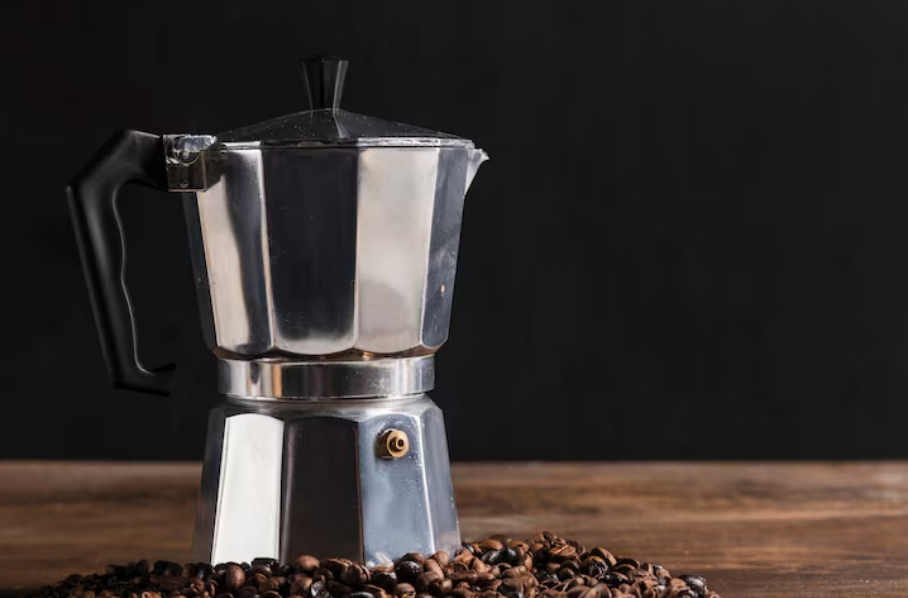
Check easy-to-see places first: the spout, the place where coffee brews, and where you add water. These areas get clogged with coffee grounds and hard water buildup. Take out where the coffee goes and look for any clogs in the holes.
If you can, take out any hoses and look at a small valve inside. A small ball valve in many machines gets blocked easily. Clear it with a needle or soft brush. For tough clogs, soak parts you can remove in a cleaner that removes buildup.
Fill it with water and time how long it takes to brew. Then compare this time to what the manual says. A big difference means there might be a clog or the pump is weak.
Check each part one by one. Check if water goes smoothly from where it’s added to the pump. Then, see if the pump gets water into where it heats up. Make sure the exit for the coffee is not blocked. Listen for weird sounds from the pump or use a flow meter if you have one. This will help figure out if cleaning is enough or if it’s time for new parts.
Don’t try replacing pumps or boilers until after cleaning doesn’t help. Call a pro for dealing with wires, changing the pump, fixing boiler issues, or if leaks keep happening. If water got on the controls while trying to fix it, let it dry well. Then, have a pro make sure it’s safe to use.
If cleaning well doesn’t help or you think damage is from very soft water, get in touch with the company’s support. This could be Breville, Cuisinart, or Keurig. Their trained workers can find any internal damage and fix it right to avoid more issues.
Often, just cleaning well, taking care of the valve, and changing the filter fix slow brewing. Always use the proper tools and be safe. If quick fixes don’t work, getting it repaired by a professional can stop more damage.
Tiny tweaks to beans, grind, temperature, and water can boost both brew speed and taste. This guide will help you make your coffee faster and tastier, while keeping your machine in top shape. Follow these tips to prevent clogs and get an even extraction.
Get your hands on fresh, top-notch beans from reputable roasters such as Stumptown, Counter Culture, or Lavazza. Keep those beans in a sealed container away from light and heat to keep the flavor strong.
Make sure your grind size matches your drip machine. Too fine and you clog the filter; too coarse and you get weak coffee. Adjust your grinder for the best size to enhance both the speed and taste of your coffee.
Aim for a brewing temperature between 195°F and 205°F to extract the perfect flavor. Slow heating machines might need a descale to remove scale buildup and improve warm-up times.
Filtering your water reduces mineral buildup, extending the life of the heating element and keeping flavors right. Use a simple pitcher or in-line filter to cut down on scale while keeping important minerals for a balanced taste.
Stick to the brew time suggested by your coffee maker’s manufacturer. If it’s brewing slower than usual, you might have a scale issue, clogged screens, or tightly packed grounds.
Adjust the coffee-to-water ratio and the grind to get the perfect brew time without clogs. Pick the right filter and grind size to fix slow brewing and maintain delicious coffee.
Choosing a new coffee maker involves several factors. Consider what’s most important to you: how fast it brews, cleaning ease, warranty, and getting parts. A simple manual and easy descaling mean fewer problems later.
Look for strong pump power and stable heating for quick and even brewing. Features like removable parts and water filters make cleaning and maintenance easier. These also help your coffee maker last longer.
Find models with simple descaling and clear signs when it’s needed. Ensure you can get replacement filters easily. A solid warranty and service can save time and stress if issues arise.
Manual coffee makers like pour-over and French press have fewer clog risks. They offer more control but require skill for the right temperature and timing.
Automatic machines brew with less effort and quicker, ideal for busy mornings. Yet, they need regular care like descaling and replacing filters to keep running smoothly.
Choose brands known for strong support and maintenance tips. Breville and Rancilio are great for espresso, offering education and parts. Technivorm is top for quick pour-over machines that are easy to maintain.
Mr. Coffee and Cuisinart offer many options at different prices, but watch for flow issues. Keurig is perfect for quick single-serve coffee but watch for scale build-up and check pod compatibility. Choose a brand with good local service to reduce repair times.
| Brand | Best For | Speed & Maintenance Notes |
|---|---|---|
| Breville | Espresso and specialty brewing | Strong heating systems, clear descaling steps, readily available parts |
| Rancilio | Home espresso with pro build | Durable pumps, serviceable components, technician network in many areas |
| Technivorm | High-speed pour-over style drip | Fast pour, simple internals, low maintenance when filtered water used |
| Mr. Coffee | Everyday drip brewers | Affordable, common replacement parts, check valve designs to avoid slow flow |
| Cuisinart | Versatile drip and programmable machines | Good service coverage, easy-access reservoirs and baskets for cleaning |
| Keurig | Single-serve pod convenience | Very fast brew cycles, needs regular descaling and water filter replacements |
Making your morning coffee great starts with a routine. Make sure to rinse the carafe every day and clean the brew basket every week. You should also change the filters as recommended and descale every three months, or more often in areas with hard water. Check for any clogs or wear in valves, hoses, and gaskets. And be sure to drain any water before you open the machine to keep electronics safe. Following these steps will help solve common problems and keep your coffee maker working well for a long time.
To make your coffee taste even better, try experimenting. Play with the grind size, the amount of coffee, and the type of filter you use. Trying new beans and using filtered water can also enhance the flavor. Small changes, like a coarser grind or a different filter, can have a big impact. These experiments are easy and safe ways to see what improves your coffee.
Scale buildup is a main reason for slow coffee flow over time. So, descaling regularly and filtering your water is important. If you find minor blockages, a careful cleaning can often fix them. But if there’s a big problem, like with the pump or boiler, you’ll need professional help. Keep a simple checklist for maintenance and follow the maker’s instructions. This will help solve slow drip issues and keep your coffee delicious and quick to brew.