Our Location
1250 Beacon Street
Brookline, MA 02446
Troubleshoot your AC not responding to remote issue with our guide on battery checks, receiver issues, and correct mode settings. Get cool again fast!
Each summer, about 40% of homeowners face a remote that won’t work, leading to a hot house quickly. This guide helps U.S. homeowners and renters with easy, low-cost fixes when your AC won’t respond to the remote.
First, try some practical tips like new batteries, making sure nothing’s blocking the signal, and cleaning the unit’s receiver. These steps often fix the problem without needing any tools or to call for help.
Follow this workflow: start with the remote, check the indoor unit, then manual controls, and safely reset if needed. Before moving to more complex steps or calling a technician, make sure to turn off the main power.
By following this guide, you’ll learn how to get your cooling back fast when possible. You’ll also know when it’s time to get a new remote or call a professional if the AC remote won’t talk to the unit.
When your air conditioner remote isn’t working, you need clear steps and quick solutions. This guide outlines common issues, how to diagnose them, and easy fixes to try before seeking professional help. Follow the guidance related to your specific problem.
Dead batteries are often to blame for a remote that won’t connect. Dropping or getting the remote wet can also lead to internal damage. The remote’s IR or LED emitter might get loose or blocked, too.
Electronics nearby could disrupt the signal. On the air conditioner’s side, a dirty sensor might seem like the remote is broken. Problems like bad control boards, tripped fuses, or switched-off power can also ignore remote commands. And, issues like clogged drains or frozen coils might trick you into thinking the remote has failed.
If your remote’s screen is blank or the LED doesn’t light up, it’s likely a battery issue. But if the remote seems fine and still can’t connect, check the signal path or the AC’s receiver. If manual controls work but the remote doesn’t, its signal isn’t reaching the unit.
To troubleshoot, point the remote at a smartphone camera and press a button. If you see an IR flash, the issue might not be with the remote. Check for a second remote of the same model, and look for rust on the battery contacts. Also, ensure the AC’s power is on.
Keep track of what’s happening and what fixes you’ve tried. This info helps a lot if you need to call a technician or refer to the manual.
When your AC doesn’t respond, first check the battery in the remote. Many problems are easy to fix and can save you from calling for service. A dead or weak battery is often why an air conditioner’s remote fails.
Before changing anything, look for signs of a low battery. A remote display that is blank or dim is a clear sign. Weak or no light from the LED or IR emitter when you press buttons means low power. If the remote only works up close or sometimes not at all, the batteries might be low.
– Blank or dim display on the remote.
– Little or no LED/IR flash when buttons are pressed.
– Remote works only at very close range or responds intermittently.
For most split-system remotes, slide off the battery cover. Others use a push-tab. Your user manual lists the right battery type: often AAA, AA, or CR2032. Don’t mix old with new batteries. Look for corrosion on the contacts. If you find any, gently clean with a cotton swab and isopropyl alcohol. If there’s severe corrosion or the remote got wet, consider getting a new one.
Turn the remote on and check the display. Press some simple buttons and watch the indoor unit for a reaction. To see if the infrared emitter works, use your smartphone camera; you should see a faint flash on its screen. Test the remote from a normal distance, up to 10 meters for most models. If it still doesn’t work, try a remote from the same brand to see if the problem is with the unit. Following these tips can solve your AC remote issues quickly.
If your AC’s remote isn’t working with the indoor unit, the issue might be with the receiver. Begin by looking closely at the indoor unit’s front panel, especially near the display or control area. In split systems and ductless mini-splits, the IR or RF receiver is often found behind a small, clear panel on the front.
Check for problems like dirt, dust, or a faded plastic cover that could block the signal. Look out for water damage, rust, or cracks in the sensor window, as these suggest deeper issues. If your AC responds to its panel but not the remote, the receiver might be at fault, not the remote’s batteries.
Look in the owner’s manual to find the receiver’s exact location and model number. For well-known brands like Mitsubishi, Daikin, LG, and Panasonic, you’ll usually find the receiver close to the display lights. It might be hidden behind a dark strip that matches the outer shell.
Before cleaning the receiver, be sure to turn off the AC to avoid any electrical hazards. Clean the sensor window carefully with a soft, damp cloth. Use isopropyl alcohol if it’s really dirty. To get dust out of tight spaces, try using short bursts of compressed air.
Make sure nothing’s blocking the receiver, like decorations or curtains. After cleaning, try using the remote again from the proper distance and angle. If the remote’s light flashes but the AC doesn’t respond, there might be an issue with the indoor board or receiver. In this case, it’s best to call a technician.
If your air conditioner’s remote isn’t working, it might be set to the wrong mode. It can be set to Cool, Heat, Fan, Dry, Auto, and even special modes for timers or sleep. If it’s in the wrong mode, the AC won’t respond to commands. Make sure you’ve got it set right before trying other fixes.
Some universal or replacement remotes need to be paired or set with a brand code. Brands like Mitsubishi, Daikin, Fujitsu, LG, Samsung, and Panasonic offer remotes that fully control their units. If your remote won’t connect, make sure you’re using the right model code. Then, follow the pairing instructions in your manual.
Most remotes have a MODE button for switching modes. Just tap it to cycle through the options. Some advanced functions might require you to hold the button for a few seconds. If tapping MODE does nothing, try taking out the batteries. Then press every button to reset it, and put in new batteries.
Look for icons on your remote that show the mode, fan speed, set temperature, and timers. For cooling, you’ll want to set it lower than the room’s temperature. If the icons are hard to see or gone, your remote might be locked or on child-lock. This lock stops you from changing modes.
If you’re still having trouble with the modes, consider these tips. If the remote won’t switch modes even after resetting and trying to pair again, it might not be connecting. This could mean there’s an issue with the receiver or it’s not compatible. When you ask for help, know your remote’s model and your AC’s brand to speed things up.
| Symptom | Likely Cause | Quick Fix |
|---|---|---|
| Remote shows wrong mode | Mode button accidentally cycled or child-lock active | Press MODE to cycle; disable child-lock per manual |
| Commands ignored in one mode | Unit set to different function (e.g., Fan vs Cool) | Set remote to matching mode and confirm temperature |
| Remote not pairing with unit | Incorrect brand code or pairing steps missed | Check ARC model number and follow pairing sequence |
| Buttons unresponsive | Low batteries or electronic lock | Replace batteries; perform remote reset by discharging |
| Universal remote limited functions | Code lacks support for advanced modes | Use brand-specific remote or remap code per manual |
A small change in where you stand can make a big difference. This guide gives helpful tips to fix remote issues with your air conditioner by yourself. It talks about the importance of distance and clear sight.
Infrared remotes generally work well within 33 feet. But, the angle and any blockages can reduce this range. Point the remote directly at your AC’s receiver for the best effect. Try moving closer if the remote does not work.
Start by standing 2–3 feet away. If the AC responds, step back gradually but keep the remote aimed at it. To check the remote’s signal, use your phone’s camera. If you see a light but the AC doesn’t react, there might be issues with the AC itself and not the distance.
Things in your home like furniture or plants might block the remote’s signal. Even sunlight can confuse the AC sensor. Move these items out of the way and try again to see if it helps with the AC remote issues.
Sometimes, electronic gadgets interfere with the remote’s signal. Wi-Fi, lights, and even microwaves might be culprits. Dirt or moisture on the remote or AC sensor also lowers their range. Clean them with a soft cloth to improve connectivity.
Steps to take:
Following these tips usually fixes remote issues. If there’s still trouble after checking distance and clear sight, it might be time to look at the AC’s receiver or get professional help.
Doing a hard reset can fix short-term errors. It helps the remote and the AC unit talk to each other again. Try it if your AC won’t listen to the remote after a power issue. Make sure to follow safety steps and check how it starts up.
First, turn the AC off with the remote or on the wall. Then, turn off power at the AC’s local disconnect or breaker.
Wait between 5 and 30 minutes. Waiting 30 minutes is better for tough problems because it lets components reset fully. Then, turn the power back on. Use the remote to set a cool temperature.
Some AC units have a reset button. Look in the manual from Bryant, Trane, Carrier, or Mitsubishi for how long to press it; usually it’s 2-5 seconds. If your thermostat is separate, reset it too. For thermostats with batteries, take the batteries out for a quick reset.
Resets can fix software problems and help your remote work with the AC again. They are helpful for fixing errors from sensor issues or power problems.
If resetting doesn’t work, the issue might be with internal parts or a safety shutdown. These problems need a skilled HVAC technician to take a look.
Always turn off power before touching internal AC parts. Stay away from high-voltage areas. If a breaker flips off a lot or you hear odd sounds when it starts, get a qualified technician. Trying to reset many times might not be safe.
Remote sensing allows your air conditioner to follow simple commands from a remote or app. When the unit doesn’t respond, people often think the remote is the problem. However, a functional sensor and correct setup ensure the system works well and reduces the hassle of fixing remote issues.
Here, we explain how sensing technology operates and possible faults. This information is useful if your AC remote isn’t working or you need tips on how to fix it.
Most remotes use infrared (IR) LEDs to send signals to a receiver on the air conditioner. This receiver interprets the signals to control power, mode, fan speed, temperature, and timers.
Some newer systems use radio frequency (RF) or Wi-Fi. This allows them to work over longer distances and lets you control them with an app. Setting up RF and Wi-Fi involves pairing and connecting to a network. It might also require creating an account with the manufacturer.
More advanced remotes can sense room temperature, humidity, and movement. These features help adjust settings for better comfort. A well-functioning sensor means your AC works reliably, avoiding frequent troubleshooting.
A common reason for remote failure is a blocked or dirty sensor. Clean the receiver carefully and make sure nothing’s blocking it.
If the sensor’s casing is damaged or if it’s exposed to water, it can harm the internal parts. This often results in the receiver working poorly or not at all.
Electronic devices nearby can interfere with the remote’s signals. And, if the air conditioner’s control board is faulty, it won’t respond to the remote. These issues can affect IR, RF, and Wi-Fi signals.
If you’re using RF or Wi-Fi and the remote isn’t working, check the connection and pairing. Restart your Wi-Fi router and try pairing again before you think it’s a hardware issue.
To troubleshoot, use your smartphone camera to see if the IR remote is sending signals. Also, testing with another remote of the same brand can help identify the problem. These are easy steps to figure out where the issue lies.
| Symptom | Likely Cause | Quick Test |
|---|---|---|
| No response at all | Dead batteries, broken IR LED, failed receiver | Try phone camera for IR, swap batteries, test spare remote |
| Intermittent response | Dirty receiver window, loose wiring, interference | Clean receiver, move devices, reboot router for RF/Wi‑Fi |
| Remote works but app control fails | Network or pairing issue | Check Wi‑Fi, re-pair app, consult brand app steps |
| Unit accepts some commands only | Partial sensor or control board failure | Test all modes, run diagnostics from manual, contact service |
When your AC doesn’t answer to the remote, manual controls are a quick fix. These buttons let you test if both the inside and outside parts are working. This way, you can tell if the problem is with the remote or the AC itself.
Find the control panel on the indoor unit. On many models, buttons are under a flip-up panel or on the corners. You’ll see buttons for Power, Mode, Fan, Temp Up/Down, and sometimes a Timer or Reset.
To start, press Power. Keep changing Mode until you see the cooling sign, then lower the temp below room level. First, run the fan. Then, try cooling to test if the compressor and outside fan start.
Look in the user manual for button names and what the LEDs mean. You’ll see symbols like a snowflake for cool, a sun for heat, a droplet for dry mode, and a fan for fan-only. These controls give fewer options than the remote but enough for basic checks.
If the unit works with manual controls but not the remote, the issue might be with the remote’s communication or a broken receiver. If manual controls also fail, check the power—look at the breaker, power cord, and any outdoor switch.
Manually test the AC’s performance. Let the compressor work and listen for the outdoor parts to start. Feel if the air gets cooler after a bit to make sure the AC is functioning.
These essential steps aid in fixing problems when the AC remote won’t work or connect. A proper manual check can show if the issue is just with the remote or if it’s more serious.
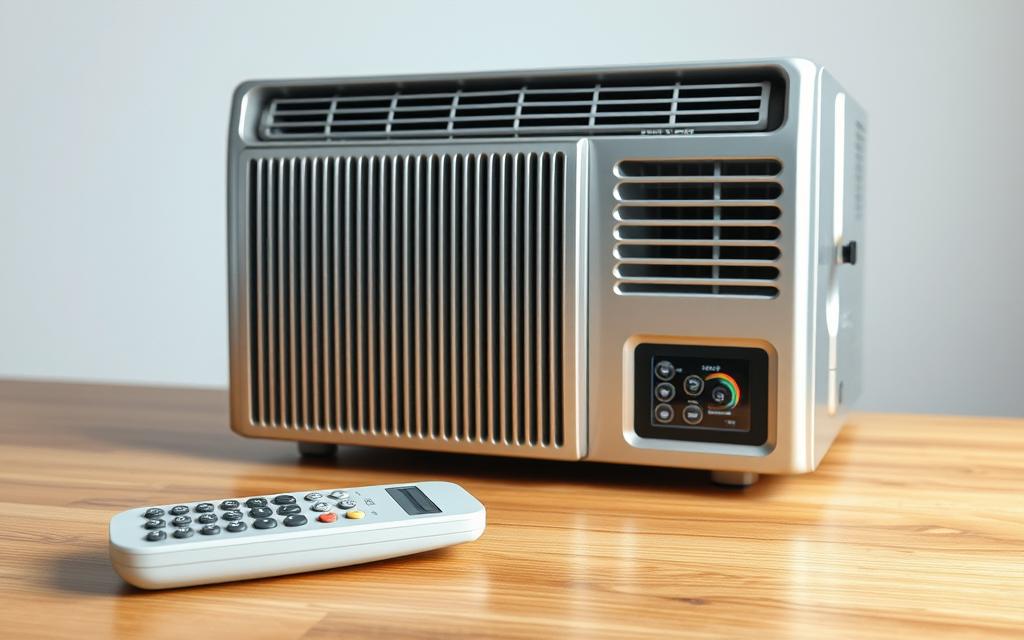
If your AC won’t respond to the remote, start with detailed steps that fit your AC model and what you’re comfortable doing. Look up your AC’s instructions for information on batteries, how to pair, reset steps, where the receiver is, and what error messages mean. The manual will have safety tips and how to use less obvious features like the child lock, how to pair, and changing transmitter settings.
To see if the remote is sending signals, use your smartphone camera. Aim the remote at the camera, press a button, and watch for a blinking light on your phone’s screen. This easy test is a great way to check your AC remote at home.
If no light comes from the remote, only open it if you know your way around gadgets. Check for any loose parts, a disconnected LED, or parts that have come off. If the remote is clearly broken or the LED isn’t working, it might be time to get a new one. Getting a new remote won’t cost much and is sometimes the best choice.
To fix a remote, start by cleaning any battery corrosion with rubbing alcohol and a cotton swab. If parts look worn out, replace them and make sure the battery clips are tight. These steps often fix a remote without needing to get a new one.
For thermostats on the wall and wired remotes, make sure the wires and power are okay. Change batteries or reset it by following the manual. Stay away from repairs that involve high voltage, like changing out big parts. These are dangerous and should be left to experts.
If you’re checking receiver boards or sensors, turn off the power first and use the right tools. Only measure things like continuity and voltage if you’ve worked with HVAC electronics before. If not, it’s safer to let a professional handle it.
Choose replacement remotes made by the original brand to keep all your AC’s special features. Use the number on your old remote to find the exact match. Generic remotes might work for simple tasks but usually miss out on more complex functions.
Here’s a guide to help you decide what to do next. It shows when you can fix things yourself and when you should call in a pro.
| Symptom | DIY Action | When to Hire a Professional |
|---|---|---|
| No IR flash from remote | Test with smartphone camera; clean contacts; replace batteries | Remote still dark after internal repair or LED replacement |
| Remote emits IR but unit doesn’t respond | Check receiver location per manual; clean receiver lens | Receiver board shows no voltage or has visible damage |
| Intermittent commands | Secure battery springs; replace corroded terminals | Loose wiring inside the indoor unit or failing control board |
| Universal remote limits features | Order OEM or brand-specific replacement using model number | Need full feature set and original manufacturer pairing |
| Strange error codes or no response from panel | Follow manual reset steps and check fuses | Error persists after reset or involves high-voltage components |
If you’ve tried basic fixes like swapping batteries, cleaning the receiver, resetting the device, and re-pairing the remote without luck, it’s time for expert help. Homeowners often need a technician if the indoor unit listens to manual controls but not the remote, or if the system won’t turn on at all. Remember to check your circuit breaker first. Problems like ongoing electronic issues, breaker trips, loud noises, ice on coils, or leaks causing shutdowns also need a professional look.
When reaching out to an HVAC expert, expect them to examine everything closely. They’ll test your remote and its signals, look at the receiver, and check the main control board plus motors and capacitors. They also check power sources, inspect for proper coolant levels and coil health, and offer advice on getting a new remote, if needed. Their goal is to fix your AC remote issues fast and safely.
Look for a licensed professional with NATE certification or state-required licensing. Don’t forget to read their reviews on platforms like Google, Yelp, or Angi. Make sure they have the correct insurance and ask about any fees, labor costs, and guarantees on their work. Always ask for a detailed quote and proof of licensing before they start. For those in the U.S., choosing someone experienced with popular brands can make a big difference, especially with mini-split systems.
Know that there may be a fee just to look at the problem in person. Be aware that original remotes cost more than off-brand ones, and big repairs can add up quickly. If your AC is getting old and repair costs are high, think about talking to the technician about new options. Following this advice can solve issues with your AC’s remote and help you find a lasting solution.