Our Location
1250 Beacon Street
Brookline, MA 02446
Fix your microwave not heating issue with our quick DIY troubleshooting guide. Solve common problems in just 10 minutes!
About 10% of households face a microwave not heating issue at some point. This is annoying, especially when food stays cold. Instead of replacing your microwave or calling for pricey repairs, try some simple troubleshooting. This guide aims to show you why your microwave might not be heating. It will help you solve the problem yourself in just ten minutes!
To truly understand why your microwave might not heat up, you need to know how it works. Microwaves use a special mechanism, combining different parts, to warm food evenly. Learning about these parts helps you find out what’s wrong when there’s an issue.
Microwaves warm food with electromagnetic waves. These waves make the water in food vibrate, creating heat. A vital component, the magnetron, emits the waves that cook food. If the magnetron breaks, your microwave won’t heat, making cooking difficult.
Several important parts allow your microwave to heat food. Key components include:
If any of these parts break, your microwave might not heat well. Knowing what these parts do helps you spot issues faster.
Many different problems can stop a microwave from working. Some usual suspects include:
Finding out which part has problems can fix your microwave quicker. Understanding how your microwave heats food helps with better repairs.
Before you dive into fixing your microwave, start with some basic checks. These steps can quickly find problems and save time.
First, make sure your microwave is plugged in. Ensure the outlet works by testing it with another device. A bad power supply could stop the microwave from starting, which means it won’t heat.
Checking the door is also key. Many microwaves won’t work if the door isn’t fully closed. Make sure there’s nothing blocking the door. Sometimes, a bad door switch needs fixing for your microwave to work right.
Lastly, look for error codes on the microwave’s display. These codes tell you what’s wrong, helping fix the problem faster. Check the manual to understand what these codes mean.
The magnetron is key in making a microwave work. It changes electrical energy into microwaves for cooking. Knowing how it works and spotting when it fails are crucial for fixing a microwave that won’t heat.
A magnetron is a vacuum tube that produces microwaves using electrons in a magnetic field. It’s vital for microwaves to heat food effectively. If it fails, your microwave won’t heat, causing daily hassles.
Early detection of a failing magnetron can save your microwave from more damage. Watch for these symptoms of a faulty magnetron:
To check magnetron problems, testing must be done carefully because of high voltage. Follow these steps for a safe test:
It’s key to know the role of high voltage components when fixing a microwave. These parts are critical for making the microwave work right. They are often the cause when there’s a heating issue.
High voltage diodes are crucial in microwaves. They change the high-voltage current so the magnetron can create microwaves. If they break, the microwave might not heat well or stop working. You can tell there’s a problem if there’s a burning smell or the diode looks damaged.
Capacitors are very important for microwaves. They help keep the electrical current stable for the magnetron. When they fail, the microwave might not heat right, which is annoying. You can spot a bad capacitor by looking for bulging, leaks, or strange noises.
When checking for high voltage problems, look closely at each part for damage. Test how they work with a multimeter. If you find a broken diode or capacitor, fixing it fast can keep your microwave running well. Always be careful to stay safe from electric shocks.
The turntable and plate of your microwave are key. They help cook and heat food evenly. If your microwave isn’t heating right, it might be because of the turntable. Fixing turntable problems can make your microwave work like new again.
The turntable spreads the microwave energy all over your food. If it doesn’t spin, some parts won’t cook well. This spinning makes sure every bit of your food gets heated right.
To solve turntable issues, do these steps:
The control board is vital for a microwave’s performance. If your microwave isn’t heating, the control board might be why. We’ll look into how control problems affect heating, signs of a bad control board, and ways to fix these issues.
Problems with the control board can mess up the microwave’s function. This could lead to the microwave not heating right or even at all. If you notice buttons not working or the microwave acting up, the control board could be at fault.
To check the control board, look for signs of damage, like:
Fixing control board issues involves a careful approach:
Good airflow is key for your microwave to work right and stay safe. If the microwave doesn’t get enough air, it can get too hot. This can cause it to cook poorly or even get damaged. Notice if something is blocking the air early to avoid costly fixes.
Airflow keeps your microwave heating well. If air can’t move freely, it won’t heat food evenly. You might find your meals aren’t cooked right. Also, the microwave could wear out faster.
Keeping the microwave’s air system clean helps it run well. Here are steps to do that:
When fixing a microwave that won’t heat, it’s crucial to be safe to keep you and the microwave from harm. Electrical parts in microwaves can be very dangerous because they use high voltage. Following safety steps helps make fixing microwaves safer and easier to do by yourself.
Here are some safety tips to remember before you start fixing anything:
Turning off the power the right way is crucial when dealing with a microwave that’s not heating. Here’s how:
Fixing small problems by yourself can work, but knowing when you can’t fix it is important. Some issues involve parts that use high voltage and are very risky. Knowing when to call an expert is key to avoiding accidents:
Knowing when to call for help can save your microwave from further damage. If your microwave won’t heat, even after you’ve tried to fix it, it’s probably time for expert help. Catching problems early can avoid extra inconvenience and repair costs.
Here are signs you might need a pro:
It’s important to think about costs before deciding. Attempting repairs yourself might seem cheaper, but mistakes can lead to bigger problems. Let’s compare the options:
| Repair Option | Estimated Costs | Risk Level |
|---|---|---|
| DIY Repair | $20-$100 (parts only) | High (risk of damage) |
| Professional Repair | $100-$300 (includes labor) | Low (expert handling) |
Picking a reputable technician is key to getting your microwave fixed right. Here’s how to find the best one:
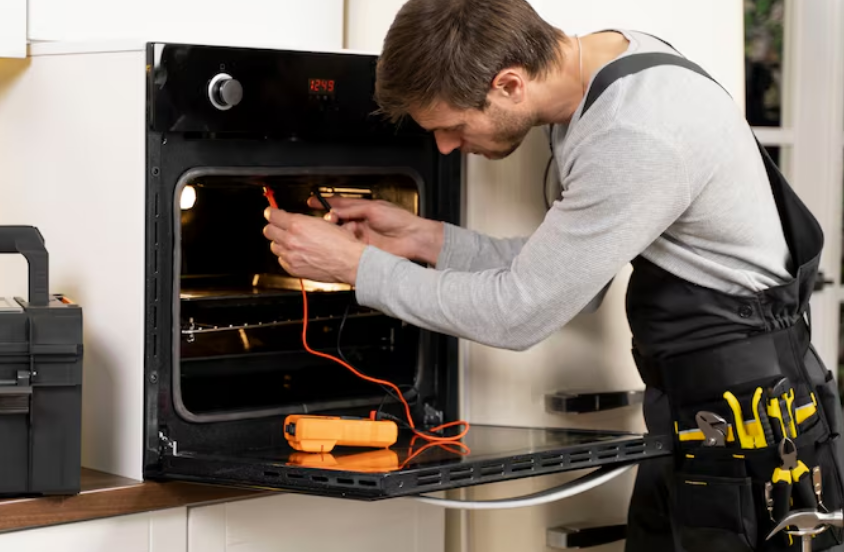
Keeping your microwave in top shape is key. Simple actions like cleaning it regularly and checking vent blockages help a lot. These steps lower the risk of it not heating properly. Also, regular checks can spot problems early, avoiding bigger issues later on.
Fixing problems early is very important. It keeps your microwave working longer and saves you from tough repairs. Looking out for odd noises or when it heats off and on is crucial. It helps stop bigger problems.
Trying to fix small issues on your own is good too. It makes you more confident in handling home appliances. When your microwave seems troubled, remember, a little effort and knowledge go a long way. You can keep it running well.